Showing posts with label e-learning. Show all posts

Friday, March 26, 2010

Collaboration between Instructors & Tech Facilitators

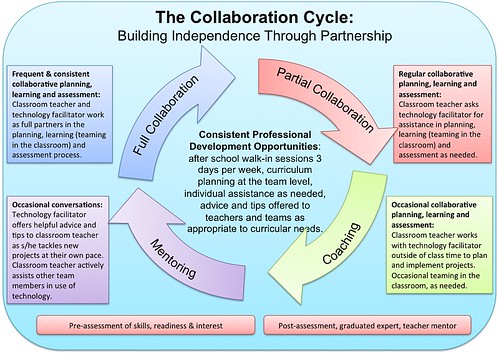
Tech & Learning offers an interesting article, "Creating a Culture of Collaboration through Technology," proposing collaboration between instructors and technology facilitators to create courses relevant in this digital age. According to the article:
Once a school begins to build this culture of collaboration, it soon becomes second nature for teachers to work in partnership with the technology facilitator, bringing new and innovative ideas into the classroom, learning new ways to meet the needs of all students, and exploring the possibilities to connect, communicate and create on a global scale. This collaborative partnership is a powerful tool to increase student learning by combining the expertise of multiple educators.


Contact us at ctl@regent.edu to learn how you can begin to collaborate with our e-learning professionals.

Friday, February 19, 2010

Attentionomics

It's a fact: people have a finite attention span. Your students have a finite attention span. Are your PowerPoint presentations helping student grasp the course content? A traditional bullet-point layout may not be the best way to go.

Chris Atherton, senior lecturer in psychology at the University of Central Lancashire at Preston in the UK, developed this PowerPoint to demonstrate a different and possibly more effective way of presenting information. This type of presentation would work especially well in distance courses.


For more information, check out Chris Atherton's blog, finiteattentionspan.wordpress.com.

Friday, October 30, 2009

Elate: An e-learning wiki

Elate wiki is a free tool that is designed to help create and facilitate a community of learning for faculty, staff, and students involved in e-learning.

The wiki is divided by pages related to course issues (e.g., accessibility, intellectual property, versioning a curriculum), instructors (writing a book prospectus, institutional review board), students (online study skills, student support), and tools (Blogs, Skype, Flash).

You can utilize the wiki without signing in, or you can sign up for a free account, which will allow you to edit pages and create new pages. Also, you can participate on discussion boards and create a “watch list”, which lets you know when changes have been made to a topic in which you are interested.